
If you have been reading about agent protocols lately, the names can blur together fast. AG-UI, MCP-UI, MCP Apps, A2A, Apps SDK, A2UI. It is easy to come away thinking the industry has produced several rival standards for the same problem.
The quick mental model
It has not.
These protocols sit at different boundaries in the system. The easiest way to understand them is to ask one question: who is talking to whom?
- AG-UI: your user-facing app talks to an agent runtime
- MCP-UI / MCP Apps: an MCP host renders UI supplied by a tool
- A2A: one agent delegates work to another agent
One naming wrinkle matters up front. As of 26 January 2026, MCP Apps is the official MCP UI extension. MCP-UI is the earlier community project that helped prove the pattern and still matters, but if you are starting fresh today, the standards-track target is MCP Apps.
TL;DR
- AG-UI is the right fit when you own the frontend experience and need a live, stateful agent session.
- MCP-UI / MCP Apps is the right fit when a tool needs to render a form, dashboard, or workflow inside a chat or IDE host.
- A2A is the right fit when one agent needs to discover, call, track, and collaborate with another agent.
- In serious systems, they are usually complementary rather than competitive.
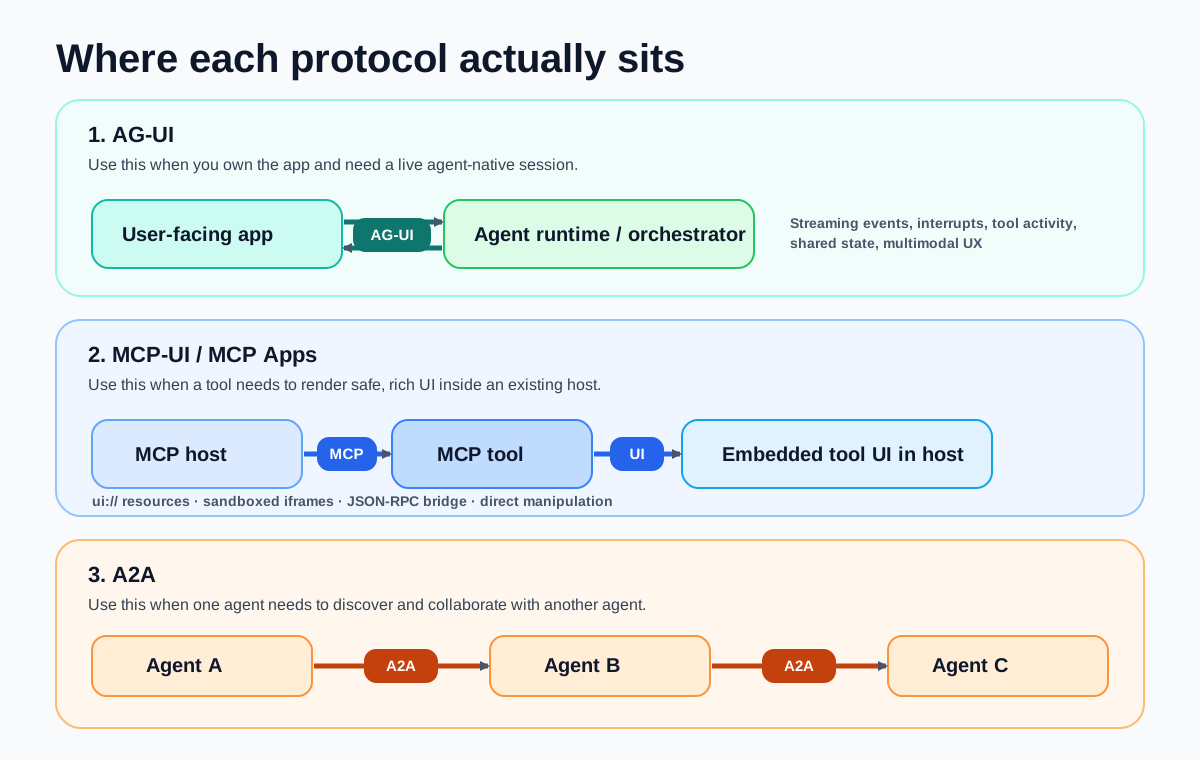
Compare the Boundary, Not the Brand
| Protocol | Primary boundary | Best fit | Core primitives |
|---|---|---|---|
| AG-UI | User-facing app <-> agent runtime | Streaming chat, approvals, interrupts, shared state, multimodal UX | Events, messages, state, lifecycle, tool events |
| MCP-UI / MCP Apps | MCP host <-> tool-provided UI | Inline forms, tables, viewers, dashboards, multi-step workflows | ui:// resources, iframe sandbox, JSON-RPC bridge |
| A2A | Agent <-> remote agent | Delegation, specialist agents, long-running tasks, black-box interoperability | Agent Cards, tasks, messages, parts, artifacts |
That comparison is the core of the article. Once you see the boundary clearly, most of the confusion disappears.
AG-UI: The Frontend-to-Agent Session Layer
AG-UI is about the app you are building, not just the tools behind it.
The official AG-UI docs describe it as an open, lightweight, event-based protocol that standardises how AI agents connect to user-facing applications. That emphasis matters. AG-UI models the things a normal REST or GraphQL API handles badly in agentic systems: streaming text, run lifecycle, tool calls, shared state, reasoning traces, human approval, cancellation, and multimodal interaction.
If you are building:
- a custom chat product
- an IDE assistant
- a voice or multimodal app
- an app where users steer long-running agent work
AG-UI solves the live session problem.
What it is not:
- It is not primarily a tool discovery protocol.
- It is not mainly about inline iframes inside another host.
- It is not an agent marketplace or delegation protocol.
In other words, AG-UI is the layer between your application shell and your agent engine.
One useful detail from the AG-UI docs is that they explicitly frame AG-UI, MCP, and A2A as complementary protocols, and note that AG-UI can work alongside generative UI specs such as MCP-UI. That is the right mental model. AG-UI is the session contract, not the entire stack.
MCP-UI / MCP Apps: The Embedded Tool UI Layer
MCP started as the agent-to-tool and agent-to-context protocol. The missing piece was what happened when plain text was not enough.
That is the problem MCP-UI explored, and MCP Apps now standardises officially. The 26 January 2026 MCP Apps
announcement is explicit: tools can return interactive UI components that render directly in the conversation. The host
fetches a ui:// resource, renders it in a sandboxed iframe, and bridges communication over JSON-RPC via
postMessage.
This is a different layer from AG-UI.
MCP UI is best when:
- the host already exists, such as ChatGPT, Claude, Goose, or VS Code
- you are exposing a tool or app into that host
- the user needs a structured interface such as a table, form, viewer, map, or multi-step wizard
- the model should stay in the loop while the UI handles direct manipulation
What it is not:
- It is not a general frontend-agent session model for your whole app.
- It is not agent-to-agent delegation.
- It does not replace MCP itself; it extends MCP with a human interaction surface.
So if AG-UI is “my app talks to my agent”, MCP-UI is “my tool brings a safe UI into someone else’s agent host”.
There is also a practical signal from the ecosystem: the MCP-UI docs now mark the legacy UIResourceRenderer as
deprecated and recommend AppRenderer, which implements the MCP Apps standard for new integrations. That tells you
where the centre of gravity has moved.
A2A: The Agent Delegation Layer
A2A solves a different problem again. It is about one agent collaborating with another agent as a peer, often across team or vendor boundaries.
The latest A2A docs frame this around Agent Cards, tasks, messages, parts, and artifacts. A remote
agent publishes a machine-readable card, commonly at /.well-known/agent-card.json, describing its skills,
authentication requirements, and endpoint. A client agent can then start a task, stream updates, poll, or receive push
notifications, and consume the resulting artifacts.
That model tells you what A2A is for:
- specialist agent discovery
- long-running delegated work
- multi-turn negotiation between agents
- black-box interoperability without exposing internal tools or memory
What it is not:
- It is not a UI standard.
- It is not an embedded widget protocol.
- It is not a frontend runtime contract.
If your system needs a research agent, booking agent, procurement agent, and review agent to collaborate, A2A is the natural fit.
Why People Mix Them Up
The confusion is understandable because all three can appear in the same user journey.
A user might talk to your app through AG-UI. That agent might call an MCP tool that renders an inline UI through MCP Apps. Behind the scenes, that same agent might hand a subtask to a remote specialist agent over A2A.
From the user’s perspective, it all feels like “the agent”. Under the hood, each protocol is handling a different seam.
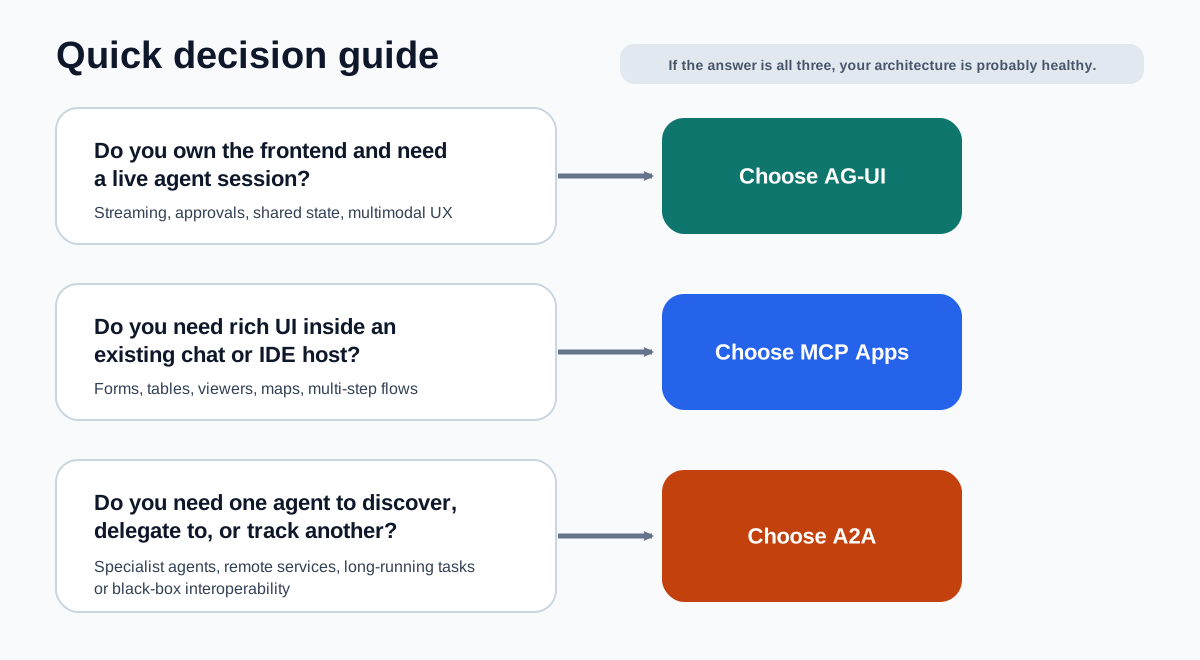
A Concrete Architecture
Imagine you are building an enterprise travel assistant.
- Your web app uses AG-UI to keep a live session between the browser and your orchestration agent.
- That orchestration agent delegates flight shopping and hotel negotiation to specialist partner agents over A2A.
- When the user needs to compare fare classes or approve a booking, the host renders a structured booking UI through MCP Apps.
That stack is not redundant. It is clean separation of concerns.
- AG-UI handles the user session
- A2A handles delegation between agents
- MCP Apps handles structured human interaction inside the host
So Which One Should You Choose?
Use AG-UI if you own the frontend and want a proper agent-native application contract.
Use MCP Apps if you want your tool to show rich UI inside existing MCP-capable hosts. If you already use MCP-UI, think of MCP Apps as the official path forward rather than a reason to throw existing work away.
Use A2A if your hardest problem is cross-agent delegation, capability discovery, task tracking, or interoperability between opaque agent systems.
If you are building something ambitious, the honest answer is probably more than one.
My Take
AG-UI is the best answer to the app-layer problem.
MCP Apps is the best answer to the inline host UI problem.
A2A is the best answer to the delegation problem.
Trying to force one of them to cover the other two usually makes the architecture worse. It produces tool calls pretending to be agents, agent calls pretending to be UIs, or frontends pretending they are just another MCP host.
The cleaner mental model is a small protocol stack:
- user <-> agent app: AG-UI
- agent <-> tools and context: MCP
- tool <-> embedded host UI: MCP Apps / MCP-UI lineage
- agent <-> remote agents: A2A
Once you see the layers that way, the landscape looks much less chaotic.