
AI coding is useful when the tools understand the project they are working on.
That is the short version of my current setup. I do not treat AI as a magic code generator, and I do not rely on a single tool to do everything. I use a small set of tools, repo-level instructions, reusable skills, framework-specific guidance, and CI checks that make the output easier to trust.
The goal is not to make AI write more code.
The goal is to make AI write code that fits the project, follows current framework practice, and comes with enough evidence that I can review it properly. The machine speed comes only as a bonus when output is mostly good.
The tools I actually use
Codex, usually with GPT 5.5 High with Fast, is my preferred AI coding agent for now.
I know that goes against the current centre of gravity around Claude Code, especially in enterprise settings, but Codex works better for me. It interacts in a way I prefer, handles repository work well, and fits the way I want to collaborate with an agent: inspect the codebase, make a plan, edit files, run checks, and iterate.
I have switched between models and tools a lot over the last year, especially where the tool is not tied to one provider.
For coding, the leading models are now close enough on benchmarks that the harness matters more: how the agent reads a repo, edits files, runs checks, handles interruptions, and talks through trade-offs. That still needs regular reassessment, but the churn has slowed enough that I can focus on automating workflows instead of constantly moving between tools.
Reusable skills are the superpower now, especially when backed by existing or new CLI tools that let them reach beyond the bounds of the local development environment.
I still use JetBrains IDEs heavily. They are hard to beat when I need deep code navigation, static analysis, symbol lookup, refactoring support, and the kind of mature IDE behaviour that saves time on real codebases.
JetBrains IDEs also support the major AI agents via the AI assistant plugin, which makes them a good base for this workflow. Agents are good at changing code, but a mature IDE is still better when I need to understand a codebase quickly or shape an abstraction manually.
I also use Zed when I want a fast read-only pass over a repo. It does not replace JetBrains for deep navigation, but it is quick and now has useful agent integrations of its own.
ChatGPT and Claude chat sit slightly outside the edit loop. I use them for planning, architecture discussions, writing, and higher-level reasoning. I still use Codex or Claude Code for those conversations when repository context matters.
Claude Code currently does better on UI code changes and PDF report generation. OpenAI’s recent image model in ChatGPT is ridiculously good at creating UI mockups, and Codex can then turn those mockups into a UI.
Copilot is my go-to code review agent mostly because it’s the easy option and then seems to do a good job.
I need to experiment more with code review tools and as such am likely to be switching to CodeRabbit shortly.
Code review automation may be the most underrated part of the setup. It runs automatically on new PRs, catches obvious issues, and often spots future edge cases that human review misses.
When code review is the first place the bottleneck moves after AI increases code generation speed, finding ways to automate review, especially for low-risk changes, is essential to keep velocity high. I also have an agent that attempts to address automated PR comments before I manually review the code. That can take several review/fix passes. The reviewer and fixer should be different models to reduce shared blind spots.
Changes need to be classified by rules, usually through a domain-specific AI skill, so low-risk changes can be auto-approved and merged into production. High-risk changes need human review. GitHub labels are a good way to communicate that on a PR.
My rule is straightforward: code written by one AI model should be reviewed by another model first. If the change is low-risk and the review is clean, automation can approve it. If the area is risky, a human still reviews it.
That mirrors the human rule: do not review your own work. Different models notice different failure modes, and that second perspective is useful before the diff reaches a person. High-risk changes need multiple reviews.
I’ve recently started using Wispr Flow, a dedicated voice-to-text app, rather than the built-in voice-to-text tools in the OS or coding apps. Wispr Flow can clean up rambling transcripts automatically. Dictating instructions is significantly faster than typing, often 3x to 5x. On mobile, it is the best option when I need to steer an agent remotely or send a quick text, Slack message, or email.
For long-running agent isolation and local OS safety, I use Docker sandboxes for local development. For less sensitive work, I use Docker Compose backed by a script to spin up one environment per agent and avoid clashes when multiple agents work on the same repository.

AGENTS.md is the source of truth
Every project needs a small amount of durable project memory.
For me, that starts with AGENTS.md. It should tell an agent enough to work safely in the repository without turning
into a second README.
The usual contents are:
- project structure
- build, test, and development commands
- formatting and naming conventions
- testing expectations
- commit and pull request conventions
- security and configuration notes
- deployment or local environment details where they affect development
The important detail is that AGENTS.md is the source of truth.
Some tools look for their own instruction files, such as CLAUDE.md or GEMINI.md. I do not want to maintain three
slightly different versions of the same guidance, so I symlink those files to AGENTS.md.
That solves a boring but real problem: instruction drift.
If the project changes, I update one file. Every agent that looks for its preferred filename sees the same guidance.

Do not bloat AGENTS.md. If you need detailed coding standards, create CODING_STANDARDS.md and link to it from
AGENTS.md. Do the same for linting, testing, deployment, or other areas that need more detail.
That lets the agent load context progressively, keeps token use down, and makes the guidance easier for humans to maintain.
Helpers before new helpers
One instruction I want in project memory is explicit: look for existing helpers first.
AI is already good at writing working code with decent instructions. The failure mode I see most often is not “this does not compile”. It is “this works, but it duplicates an existing helper”. That can be hard to spot in a small PR diff, especially without wider codebase context.
So I usually have to ask for a second pass (which should be a skill):
- look for refactoring opportunities
- reuse existing helpers before adding new ones
- create shared helpers before project-specific helpers
- keep project-specific guidance in, or linked from,
AGENTS.md
AI is very willing to solve the local problem in front of it, but it can increase long-term maintenance cost if the agent does not stop to look for existing patterns.
I want the default behaviour to be: search first, reuse second, create third.
If you ever find yourself asking the same thing for the second or third time, it should usually become a reusable skill. Skills can also reference other skills, so you can build higher-level workflows from smaller ones.
Skills are the reusable layer
AGENTS.md is for the repository. Skills are for repeatable work: domain-specific knowledge that is useful to an AI
agent but does not belong in README.md.
If a rule or workflow applies across projects, it should usually become a reusable skill rather than being copied into
every repo. My global dotfiles repo contains shared skills for browser automation, GitHub pull request work, CI
fixing, security review, OpenAI documentation lookup, image generation, PDF work, Rollbar/Sentry investigation, Vercel
deployment, and web interface review. It then symlinks those files into the relevant ~/.config or agent-specific
directories, so global skills and global config stay version-controlled.
The split is useful:
AGENTS.mdexplains this repository- global skills explain reusable workflows/domain knowledge.
- project-local skills cover genuinely project-specific work/domain knowledge.
Project-local skills should be rare. When they exist, they should be specific enough to justify living with the repo. In my own projects, examples include a blog-writing skill for this Astro site, or Laravel-specific skills around Pennant, Pest, and Tailwind in a Laravel application. If you always use Tailwind, hoist that skill to the global level, unless you need to enforce it with a team at repo level.
Some of my older or smaller projects still rely mostly on repo-level commands and generic agent behaviour. That works, but it leaves value on the table. The next step is adding better skills for PHP libraries, Go tools, Swift/macOS apps, Python projects, and other stacks where the recurring workflows are obvious but not yet encoded as general skills or domain knowledge.
One useful habit is asking the agent to review the last seven days across all repos: what worked, what repeated, and what should become a skill. That kind of self-improvement pass has found obvious workflow improvements that I had still not encoded.
Framework-specific guidance matters
Generic AI coding guidance only gets you so far.
Frameworks move quickly. Projects also carry old patterns forward. A Laravel application may contain working legacy code using older conventions, while the installed framework version supports newer, better patterns. A generic model may copy the old pattern because it is nearby in the repo.
That is where framework-specific skills and project coding standards matter.
For Laravel, I want Laravel Boost available. It gives the agent version-aware guidance and framework-specific tooling. In my ideal Laravel setup, the agent knows about Laravel Boost, Sail, Pest, Pint, Larastan or PHPStan, Tailwind, and Filament where relevant.
For frontend projects, I want Tailwind in the baseline. That means Tailwind itself, skills for using it well, Prettier,
and prettier-plugin-tailwindcss so class ordering is not left to taste or model habit.
Google’s Modern Web Guidance is also an essential skill for me, even while it is still under active preview development.
The point is not to make the agent obey a fashionable style guide.
The point is to stop the agent from learning the wrong lesson from old code. Framework skills can tell it which
patterns are current for the installed version, while AGENTS.md tells it which local patterns are intentional.
Tests before code
One of the stronger workflow rules is to create or update tests before changing implementation code where that makes sense. In practice, that is most behavioural work.
That forces the agent to state the expected behaviour before it starts patching. It also makes the later code change less ambiguous. If the agent changes tests after changing code, there is a higher risk that the test becomes a description of the implementation rather than the behaviour.
This is not a religious rule. Some tasks are exploratory. Some UI changes need visual inspection first. But when the change has clear behaviour, tests should lead.
For production issues, I also want project-specific skills that can query error reporting tools and turn recent failures into fixes. That is where skills become more than instructions: they connect the agent to the operational signals that show what actually broke.
CI is the trust boundary
AI can write plausible code quickly. That does not mean I should trust it quickly.
The pipeline is where the project pushes back.
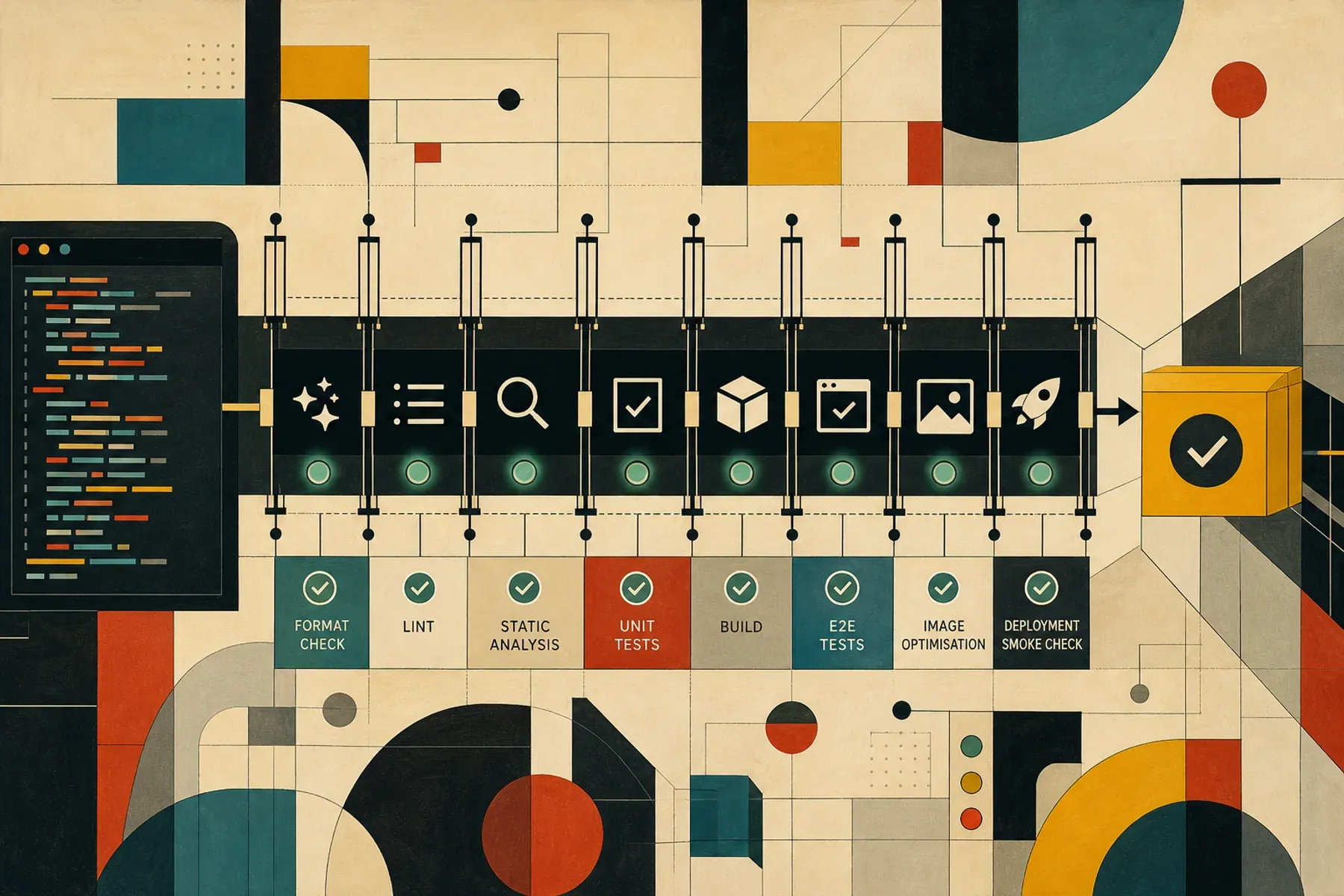
My standard checks are:
- format check
- lint
- typecheck or static analysis
- unit tests
- prod build
- end-to-end tests where relevant
- image optimisation checks
- deployment smoke checks
Different stacks fill those boxes differently. A Laravel project might use Pint, Pest, Larastan, Sail, and a Vite build.
An Astro or Nuxt project might use Prettier, ESLint, TypeScript checks, Playwright or Cypress, and a Vercel build. A Go
tool might only need go test ./... and a release workflow.
The exact commands matter less than the principle: AI-generated code should have to pass the same executable expectations as human-written code.
I do not want “the agent said it ran tests” to be the evidence. I want the commands, logs, and CI results. If logs are not already persistent, instruct the agent to write them somewhere reviewable. GitHub Actions already gives you that for CI runs.
The current shape of the system
The setup now looks like this:
- Codex does most repository-level coding work.
- JetBrains IDEs handle deep navigation, static analysis, and IDE-grade refactoring.
- ChatGPT and Claude help with planning, reasoning, and writing. Codex is equally good when it has directory context.
- Copilot reviews code, especially for edge cases. I expect CodeRabbit to replace it soon.
AGENTS.mdholds the project-specific source of truth.CLAUDE.mdandGEMINI.mdsymlink toAGENTS.mdto avoid drift.- Global skills cover reusable workflows (e.g. GitHub CLI and other associated skills).
- Framework-specific skills add version-aware guidance.
- CI/CD proves the result.
That is the part that matters most: the system is layered.
The agent does not have to rediscover everything every time. The repo tells it how this project works. Skills tell it how I want repeated tasks done. Framework guidance keeps it current. CI checks whether the result is acceptable.
What I still want to improve
The obvious next step is better skill coverage.
My newer, more active projects have better AI instrumentation than older ones. Some projects already have strong
framework guidance and local skills. Others still rely on AGENTS.md, package scripts, and whatever the agent can infer
from the codebase.
That gap is worth closing.
The more I can move recurring workflow knowledge into shared skills, the less I need to repeat myself in prompts. More importantly, the less likely it is that an agent makes a local decision that conflicts with how I want work done across projects.
I also want more project-specific integrations for production feedback: error reporting, logs, failing CI, deployment state, and smoke checks. Once an agent can inspect those signals directly, it can move from “make this change” to “investigate this failure, write a test, fix it, and prove it”.
That is where AI coding becomes genuinely useful: not because it writes more code, but because it can operate inside a well-instrumented engineering workflow.
The practical takeaway
My current AI coding setup is not a prompt. It is a set of defaults, project memory, reusable workflows, and executable checks.
Use Codex for the coding loop. Keep JetBrains for deep understanding. Use ChatGPT for thinking. Let Copilot review the
diff. Put project memory in AGENTS.md. Symlink the other agent files to it. Move repeatable workflows into skills. Add
framework-specific guidance. Make CI the final judge.
AI coding works best when the project has executable expectations and the agent has enough context to respect them.